Text to Video vs Image to Video for Your Next Clip
Choose text to video or image to video with a practical decision table, two prompts for one brief, and checks for composition, motion and supported inputs.
Use text to video when you want the model to invent the scene and can accept different appearances. Use image to video when you already have a picture whose subject, lighting or composition should guide the shot. For a product clip, the deciding question is often whether a particular object must appear, or whether any plausible version of that object will do.
We checked the current video workspace and Runway's separate text and image prompting guides while preparing this comparison. The two briefs below describe the same proposed clip. They are input plans, without a generated-video comparison or a claim that one mode produces better footage.
Start with the material you already have
A sentence such as “a white mug in a sunny kitchen” leaves the mug's proportions, handle and position open. That can be useful while exploring a mood. If you need the mug from an approved product image, typing more adjectives still leaves the model without that image.
An attached picture gives it a visual starting point, including any problems already in that picture. A cropped handle leaves that part without a complete reference. A mug close to the frame edge may disappear from view as the camera moves forward. Check those details before planning the movement.
In this workspace, image input has different roles across video models. Some modes use an opening image, while others accept visual references or start and end frames. Check the selected model's controls before treating an uploaded image as an exact first frame. A reference can guide appearance without locking the first frame or every later frame.
When to use text to video
Start with text for a new environment, a mood study or a background shot whose exact objects are flexible. An imagined rainy street, for example, can be described without first commissioning a still image of that particular street.
The prompt needs to supply both the visible scene and what happens over time. Name the subject and its surroundings, then describe one action or camera movement. “A ceramic mug on a pale oak table, soft morning light, a slow camera move forward” gives the model a scene and a motion to attempt.
For a real product, be clear about what this route can deliver. A generated mug can help explore a direction. Its handle shape cannot establish that it depicts the product you sell. If a specific appearance matters, prepare or choose an appropriate reference before proceeding.
Text to video also avoids the separate step of creating a starting image. That does not establish a lower total cost. Check the available model and the displayed credit upper limit for your actual request; another attempt is another request.
When to use image to video
Start from an image when you have approved a composition, created an illustration or photographed the subject that needs to appear. You can inspect the still before spending a video attempt on it. Look for space around the subject, complete edges and a viewpoint compatible with the movement you want.
The motion prompt can then focus on what changes. Ask the mug to stay in place and describe a small camera move forward. A large orbit would reveal surfaces hidden in the source and ask the model to invent more of the mug and table. Begin with a modest move, then inspect the handle and rim throughout the result.
Runway's image prompting guide makes a similar distinction between visual input and motion instructions for its own models. The principle helps organize a request here; its model-specific controls and results do not establish what another model will do.
One brief, two input plans
Our brief is a single quiet kitchen shot. One empty white ceramic mug sits on pale wood beside an off-white linen napkin. The handle is on the right, daylight comes from the left, and the camera moves slowly forward. No person enters the frame. There is no drinking action, lettering or change of location.
This gives both routes the same review questions. Does one mug remain on the table? Does the handle stay recognizable? Does the camera move while the product stays still?
Plan A begins with text
Use a model that accepts text without requiring an image. The following prompt supplies the scene as well as the movement.
One empty glossy white ceramic mug sits on a pale oak kitchen table, with its handle on the right. An off-white linen napkin lies beside it without covering the mug. Soft daylight enters from the left, with a gently blurred kitchen behind the table. In a single continuous shot, the camera makes a slow, small move forward. The mug and napkin stay in place. Keep the entire rim and handle visible. No people, added text or logos.
This leaves the model room to choose a mug and kitchen. If your next decision is about the overall mood, that freedom fits the brief. If the handle must match an existing product, the input is missing an important constraint.
Plan B begins with an approved image
The kitchen image from our lifestyle product photo guide already supplies the table, mug, napkin and light direction. Use an image you have permission to upload and choose a model mode that accepts it in the intended role.
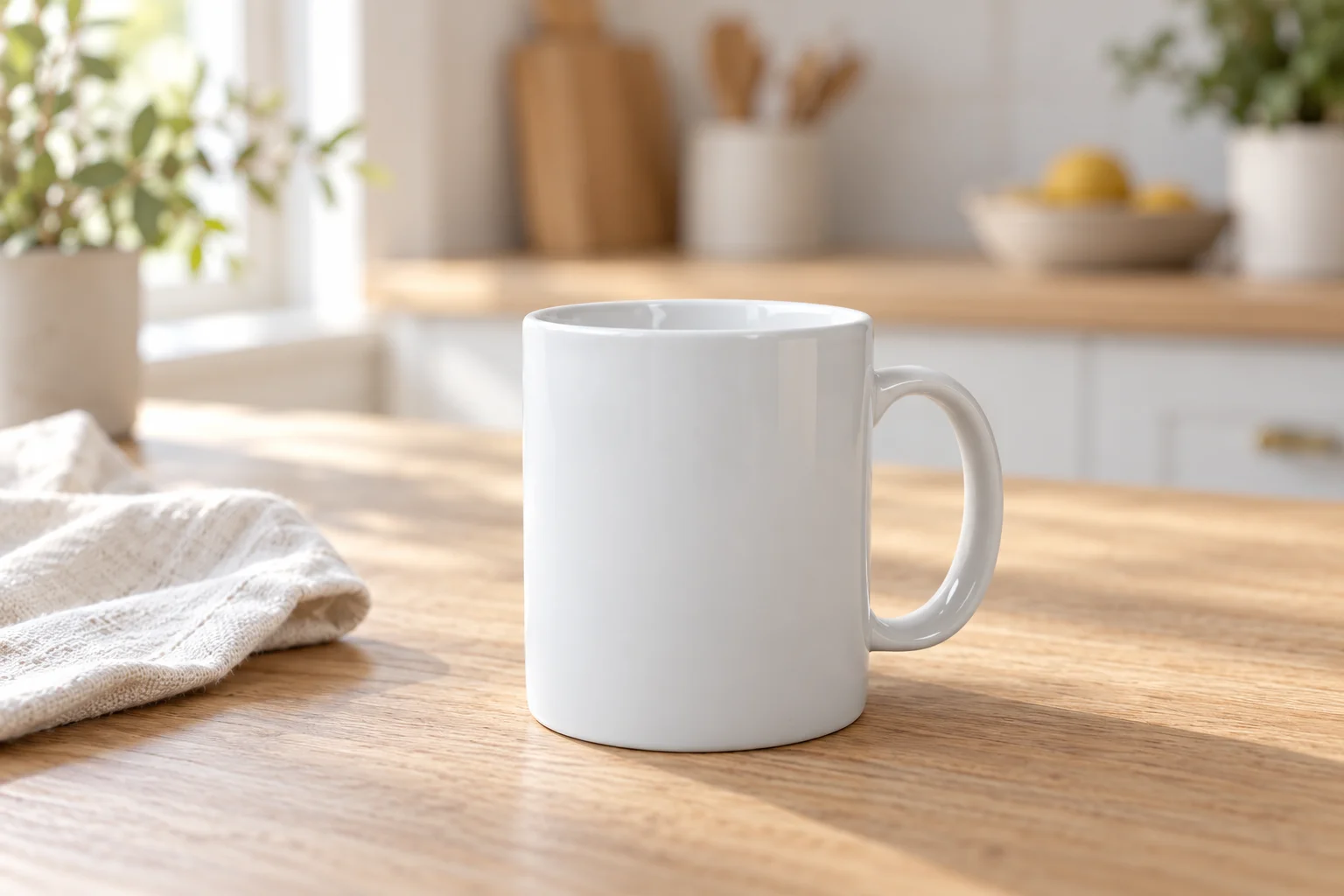
A possible image input. Inspect the rim, handle and available space before requesting movement.
Use the attached image for the opening composition, in a mode that supports an opening image. Make a single continuous shot with a slow, small camera move forward. The mug and napkin stay in place. Preserve the right-facing handle, white glaze, left-side daylight and the table arrangement. Keep the entire rim and handle visible throughout. No people, added text or logos.
The shorter scene description is deliberate. The image carries the appearance; the prompt explains the intended motion. If you select a reference-image mode instead, state that the picture should guide appearance and review the actual opening frame after generation.
A decision table for your next clip
| What you have or need | A useful starting route | Check before submitting |
|---|---|---|
| Only an idea, with flexible objects and setting | Text to video | Describe the scene and one visible movement. |
| An approved product image or illustration | Image to video | Check image-input support and whether it is a frame or a reference. |
| A fixed layout, but no suitable image yet | Prepare and approve a still first | Inspect subject placement and the intended crop before animation. |
| A reference cropped too tightly for the planned move | Revise the still or reduce the movement | Check which edges or hidden surfaces would need to be invented. |
| Two required endpoint compositions | A model mode supporting first and last frames | Confirm the inputs can be combined; inspect the transition too. |
| Pixel-accurate product details throughout | Consider filming the real object or controlled animation | Neither generative route promises exact preservation. |
Confirm the supported settings, then review the whole shot
Once the input route is clear, check the selected model's current duration, aspect ratio, resolution and sound options. These vary by model and input combination. Uploading a picture does not by itself enable sound or make an unsupported reference combination valid. Read the credit upper limit again after setting up the request.
When the clip is ready, review the opening, middle and ending. A good first frame does not show whether the handle changes later. Watch the camera movement separately from the subject, and look for an unexpected cut or an invented object entering the scene.
Keep the prompt and settings with your review notes. If you later compare the two routes, record the model, duration, output size, references and sound setting for each. A difference between two clips made under different conditions cannot establish a general winner.
Open the AI video generator with your chosen input plan. For the upload and motion steps, continue with the image-to-video guide. For the amount shown before submission, use the generation credit guide.
Sources and image credits
- Runway text-to-video prompting guide and image-to-video prompting guide, reviewed October 27, 2026. Their model-specific instructions apply to Runway.
- The kitchen image comes from the lifestyle photo guide, derived from a mug photograph by KATRIN BOLOVTSOVA under the Pexels License. The cover is an AI-created illustration of the input choices.