
AI Image Generator · Trend

Torn Paper Effect

Turn a portrait into a ripped-paper reveal or a handmade photo collage. Choose a look, add your own photo if you wish, and edit the prompt before generating.

Choose your paper effect

Make your torn paper AI photo

Reference

Use a clear photo with a model that supports image references.

Review the full credit reservation before generating.

Examples use a 2:3 portrait layout. Choose an available aspect ratio in the model settings; writing a ratio in the prompt does not change that setting.

Explore the four looks and prompts
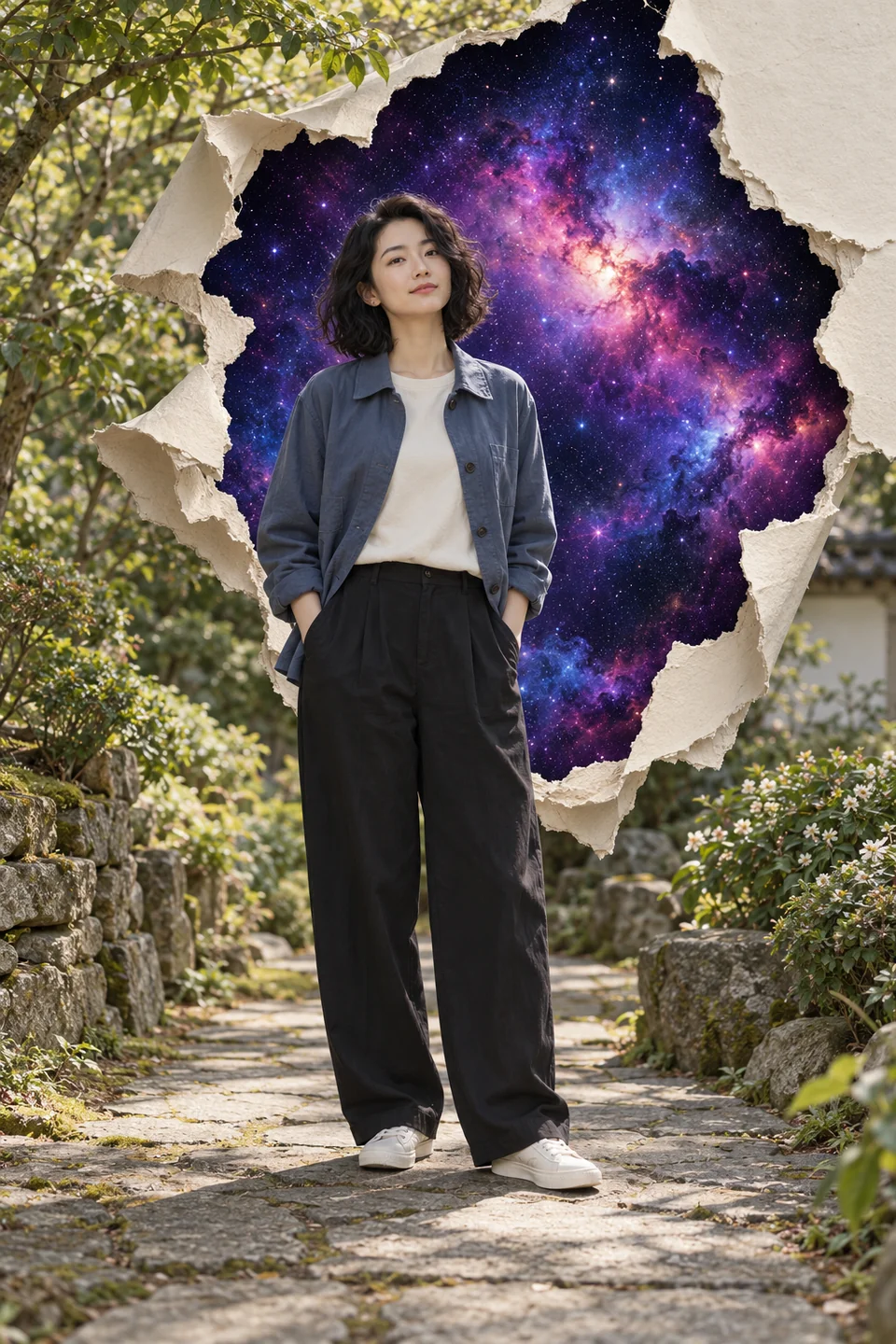
An adult woman on a garden path in front of a violet galaxy revealed through thick, curled torn photo paper
Galaxy reveal

What is the torn paper effect?

The torn paper effect makes a photograph look physically ripped, layered or peeled back. A convincing result shows uneven fibres, paper thickness, curled edges and shadows. A reveal opens the background into another scene while leaving the person intact; a collage separates the printed portrait into pieces. This torn paper effect generator lets you describe either approach and refine it in the image workspace.

Torn paper effect prompts: four looks to try

Choose what sits behind the tear, how the paper is arranged and which parts of the portrait should stay intact. Use a prompt to fill the tool, or copy it and adapt it yourself.

These are original AI-created concept images with fictional adults, not before-and-after customer photos or a guarantee of any selected model’s output. Applying a prompt does not start a generation.

An adult woman on a garden path in front of a violet galaxy revealed through thick, curled torn photo paper

Galaxy reveal

An intact portrait in front of a hand-ripped galaxy opening. Keep the original place visible around the tear.

Read the prompt

Create one vertical 2:3 torn paper effect AI photo. If a reference photo is attached, use that person as the identity reference and preserve their face, age, skin tone, hair, clothing and pose; otherwise create a fictional clothed adult on a quiet garden path. Keep the person intact and the original setting visible around the outer edges and under their feet. Tear a large irregular opening in the printed background BEHIND the person to reveal a deep violet and blue galaxy. Render thick matte photo paper, exposed white fibres, a few curled flaps and soft cast shadows consistent with the scene lighting. Keep the rip away from the face and hands. One person, one coherent body, one main paper opening. No glowing ring, torn skin, repeated limbs, text, logos, watermark or interface.
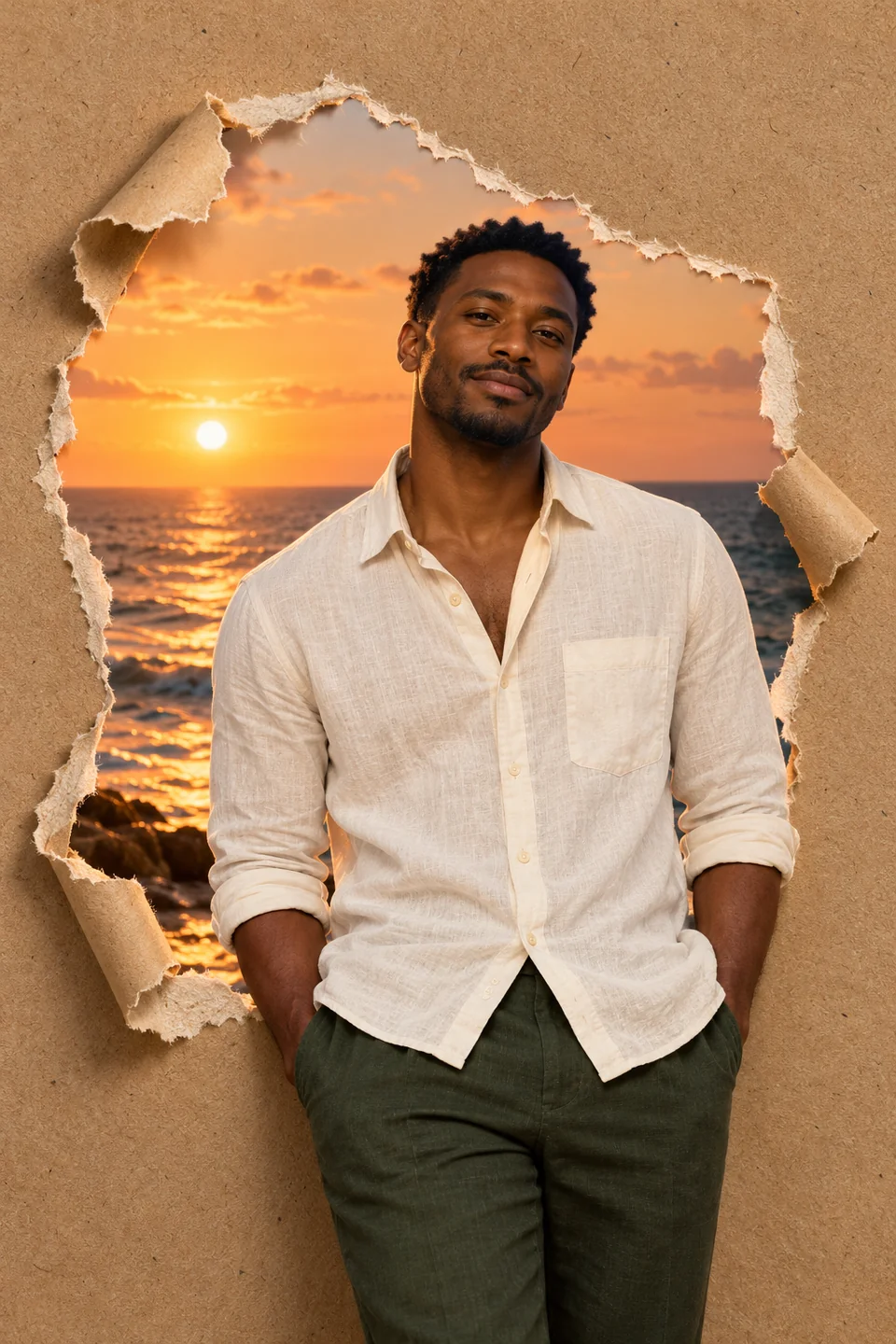
An adult man in a cream linen shirt emerging through fibrous brown kraft paper with an ocean sunset behind him

Kraft-paper sunset

Warm brown paper opens onto a peach ocean sunset. The portrait overlaps the paper edge for depth.

Read the prompt

Create one vertical 2:3 torn paper portrait AI image. If a reference photo is attached, preserve the person’s face, age, skin tone, hair and clothing; otherwise use a fictional clothed adult in a cream linen shirt. Build a waist-up portrait in front of a broad irregular opening in matte brown kraft paper. Reveal a peach and gold ocean sunset inside the opening. Keep the face and torso whole, overlapping the lower paper edge naturally. Show recycled paper grain, cream torn fibres, visible thickness, restrained rolled corners and soft upper-left contact shadows. The sunset replaces the original background. One person with natural anatomy. No rock opening, fabric tear, text, logos, watermark, device frame or interface.

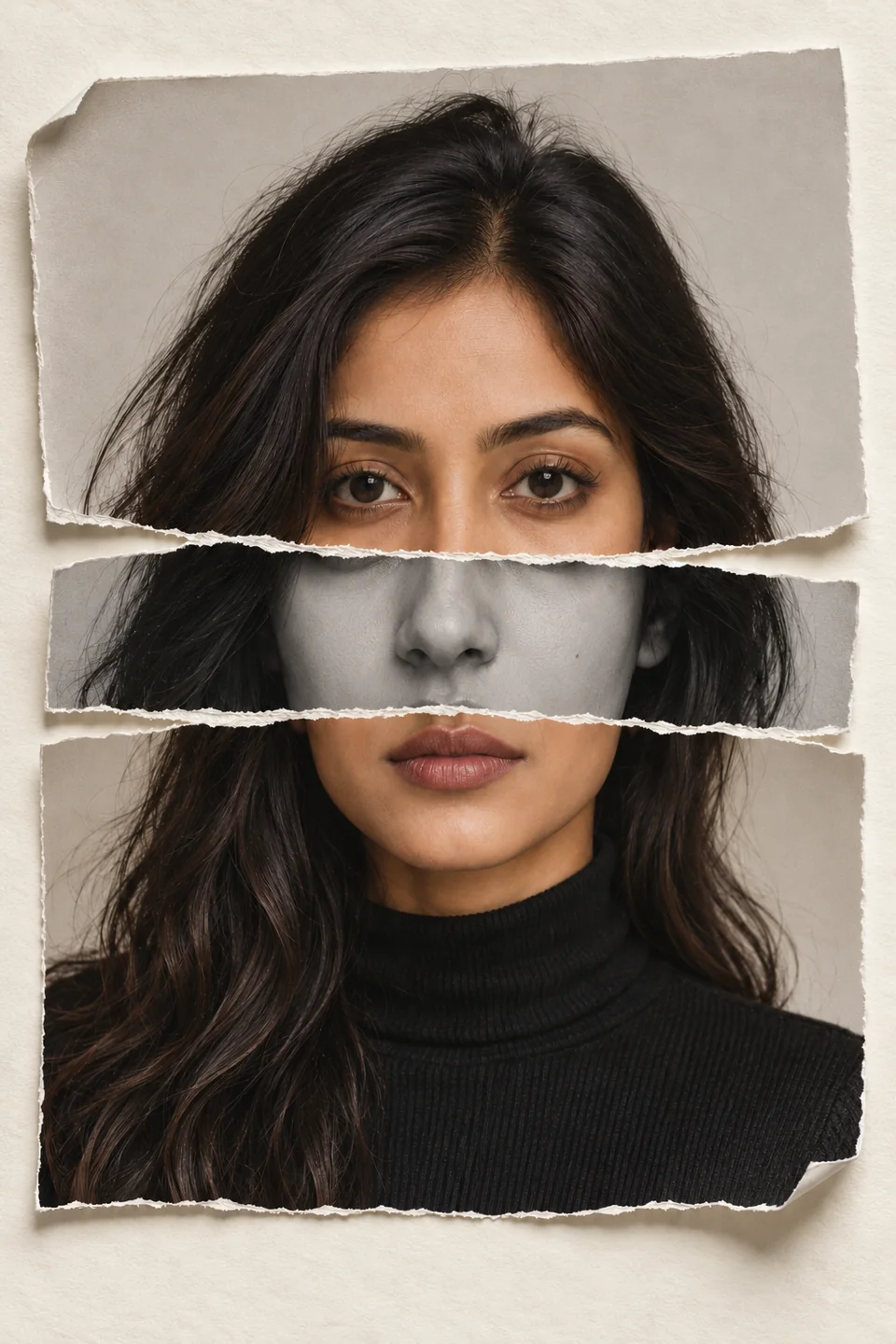
A dark-haired adult woman’s portrait assembled in three horizontal torn photo-paper strips on an ivory background

Portrait strips

A portrait arranged in three tactile bands, with a monochrome middle strip and small, deliberate offsets.

Read the prompt

Create one vertical 2:3 editorial torn paper photo collage. If a reference is attached, preserve that person’s identity, hair and clothing; otherwise use a fictional adult woman in a black turtleneck. Print ONE head-and-shoulders portrait on thick matte paper, then arrange it in THREE horizontal torn bands on ivory paper. The upper color band contains the forehead and both eyes, the narrow monochrome middle band contains ONLY the nose and cheeks and ends above the lips, and the lower color band contains the one mouth, chin, neck and shoulders. Keep one anatomically coherent face with no repeated eyes, nose or mouth. Use small gaps and minimal side offsets, white fibrous edges, slightly lifted corners and realistic soft shadows. No torn flesh, extra features, text, logos, watermark or interface.
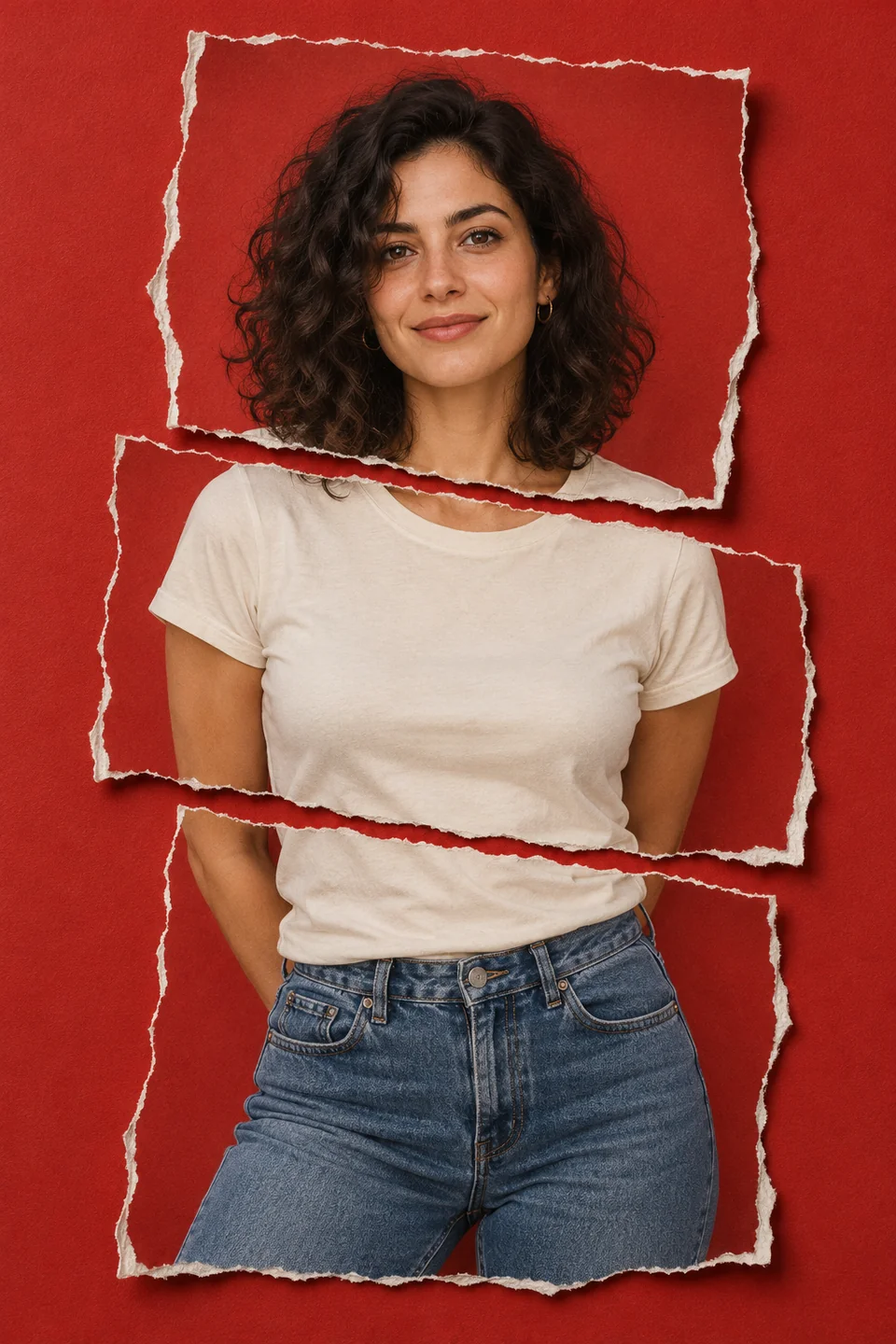
A curly-haired adult woman’s photo torn into three offset pieces with white fibrous edges on brick-red paper

Red photo collage

Three broad ripped-photo pieces sit on brick-red paper. Keep the face together and stagger the body pieces.

Read the prompt

Create one vertical 2:3 torn paper AI photo collage. If a reference photo is attached, preserve the person’s identity, hair and clothing; otherwise use a fictional clothed adult with curly dark hair, an ivory shirt and blue jeans. Arrange a head-to-hips photograph as THREE broad hand-torn pieces on matte brick-red paper. Keep the entire face in the top piece. Separate shoulder, torso and waist areas with narrow red gaps and slight alternating offsets while preserving one continuous body. Show exposed ivory fibres, photo-paper thickness, lightly lifted edges and consistent contact shadows. No duplicated face or body parts, torn skin, scissors, hands holding the paper, captions, logos, watermark or interface.

How to make a torn paper effect with AI

  1. Start with a photo or a person in mind

    For a personal portrait, sign in, choose an image model that accepts references and add a clear photo you have permission to use. A full-body or waist-up shot suits reveals; a close portrait suits strips. You can also describe a fictional adult without uploading a photo.

  2. Choose the tear and adjust the composition

    Apply a prompt above, then change the paper, background reveal and light direction. State which details must stay the same. Select a supported portrait ratio in the settings and check that the tear leaves the face readable.

  3. Review the quote, generate and inspect

    Check the displayed reservation and balance, then generate in the existing image workspace. Inspect the face, fingers and torn edges at full size before downloading. Further generations or edits have their own displayed credit costs.

Close detail of curled kraft-paper edges and shadows around an ocean sunset portrait

Better torn paper portraits, one detail at a time

Give the paper a physical thickness
Ask for matte paper, exposed white fibres and contact shadows. If the tear looks like a flat sticker, add a few curled flaps and specify the light direction. Avoid a glowing ring when you want a paper reveal.
Keep the subject instructions consistent
Use one sharp reference and preserve face, age, skin tone and hair. Replace any fictional-person description in the prompt with your subject. A reference can guide likeness, but an AI result may still change facial details.
Check that each feature appears once
In strip collages, specify what belongs in each band and keep offsets small. Look for repeated eyes or mouths, mismatched jawlines and broken fingers. For red collages, keep the full face on one piece.
Change one thing in the next turn
If you like the portrait but not the paper, request a change to the tear only and ask to preserve the subject. If the image is too busy, reduce the number of fragments. Review the new quote before each generation.

Torn Paper Effect questions

Photo choice, editable prompts, model settings and credits.

What does “torn paper effect” mean?

It is an image treatment that imitates a photograph or sheet of paper being ripped by hand. Rough fibres and shadows give the edges depth. You can use an opening to reveal another scene or arrange the portrait as separate paper pieces.

Can I make a torn paper AI photo from my own portrait?

Yes. Select a model that supports reference images and upload a clear photo you have permission to use. Tell the model to preserve the subject’s features. Without a reference, you can describe a fictional person instead; it will not be a portrait of you.

What should a torn paper effect prompt include?

Describe the subject to preserve, the tear position, the scene or paper behind it, the edge material and the lighting. For example, keep the portrait intact, open the background into a galaxy, and show thick paper with rough white fibres and soft shadows. The four prompts above are editable starting points.

Is a torn paper double exposure the same as a paper reveal?

They are related visual ideas. A reveal opens a hole in the paper to show another scene. A strip or double-exposure look combines different treatments or views of a portrait across ripped bands. Specify the layout you want, especially which facial features belong in each strip.

Does this generator make an animated paper tear?

This page uses the image generation workflow and produces still images. A paper-tearing animation needs a separate video workflow; the examples here are still concept artworks.

Why did my torn paper portrait AI result change my face?

A small or filtered reference, conflicting person descriptions and large offsets can all make likeness harder to retain. Use one clear reference, simplify the scene and ask to preserve facial proportions. Review the result closely; exact identity preservation is not guaranteed.

Which model and aspect ratio should I use?

Choose an available image model that supports the references you need. The examples are vertical 2:3 compositions. Select a supported portrait ratio in the settings; prompts cannot enable an unsupported input or force a different model parameter.

How many credits does the torn paper effect generator use?

The tool uses the same pricing as AI Image Generator. The selected model, resolution, output count and supporting AI work affect the displayed reservation. Credits are reserved before work starts and settled using verified costs. A disconnect or failed delivery alone does not prove the upstream service charged nothing.

Can I download just a transparent ripped-paper border?

The examples here are complete portraits with backgrounds. A visible paper opening is not a guarantee of transparent pixels. Output formats and transparency depend on the selected model and result; check the downloaded file before using it as an overlay.

Continue in the image workspace

Explore other image ideas or review plans and credit top-ups.